
Amazon Carton Labeling Mistakes That Lead to Costly Delays
Definition
Common labeling errors on cartons shipped to Amazon that cause processing delays, additional fees, misrouted inventory, and stranded stock.
Overview
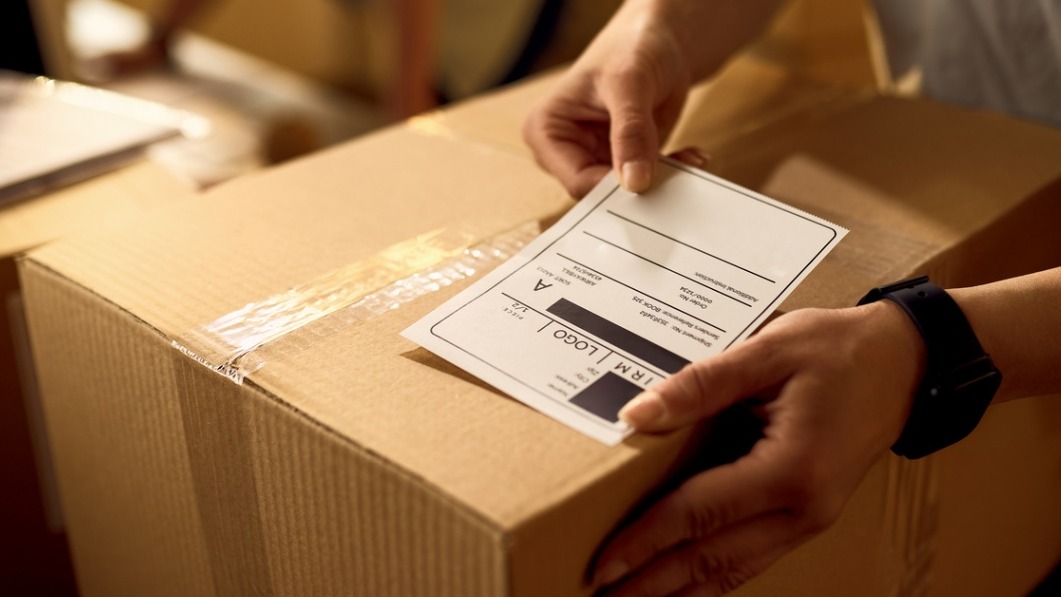
Amazon carton labeling is the process of applying the required barcodes and shipping labels to each outer carton (and pallet where applicable) when sending inventory to Amazon fulfillment centers. For sellers and third-party logistics providers working with Amazon FBA, accurate carton labeling is critical: Amazon scans carton labels on arrival to route, receive, and store inventory. Mistakes in carton labeling are a frequent source of costly inbound delays, chargebacks, and inventory reconciliation problems. This entry explains the most common mistakes, why they matter, real-world examples, and practical fixes and best practices for beginners.
Why correct carton labeling matters
- Amazon relies on machine-readable barcodes to quickly identify shipment contents and assign inventory to the correct ASIN/FNSKU. Unreadable or incorrect barcodes require manual intervention.
- Incorrect labels can result in misrouting, rejected inbound shipments, or placement of stock in the wrong fulfillment center, delaying availability for sale.
- Amazon charges fees for labeling noncompliant cartons, and repeated errors can lead to operational restrictions or account issues.
Common labeling mistakes that cause delays
- Wrong barcode type or wrong FNSKU/ASIN — Applying a UPC or manufacturer barcode when Amazon requires the FNSKU, or printing the wrong FNSKU for a product, causes scans to identify the carton as a different SKU. This leads to miscounts and rework.
- Unreadable or poor-quality print — Low-resolution printers, smudging from inkjet printers, or using worn thermal heads produce faint or broken barcodes that scanners cannot read.
- Labels placed on seams, corners, or irregular surfaces — Labels across carton edges, seams, or over textured surfaces can wrinkle or tear during transit, making the barcode unreadable.
- Multiple barcodes in close proximity — Having more than one scannable barcode (carrier label and Amazon carton label) overlapping or too close together can lead scanners to read the wrong code.
- Incorrect carton quantity or content information — If the number of units per carton printed on the carton label does not match the shipment plan, Amazon may hold or inspect the shipment to confirm contents.
- Missing or misplaced pallet/carton labels — For palletized shipments, failing to include pallet ID labels or placing them on the wrong pallet face slows unloading and receiving operations.
- Use of noncompliant label materials — Glossy materials, labels that peel off in transit, or labels that react with tape or adhesives can cause barcodes to distort or detach.
- Handwritten or altered labels — Handwritten corrections or additions that obscure the barcode or important ID fields force manual checks and slow processing.
- Missing hazard or special handling labels — For batteries, liquids, or fragile items, failure to add required hazard or handling labels can cause the shipment to be refused or require additional documentation.
Real examples
- A midsize seller printed FNSKU labels with an old template that contained a misaligned barcode. When 350 cartons arrived, scanners failed to read the code, triggering a full manual inspection and a three-week receiving delay until cartons were relabeled.
- A supplier used glossy labels taped over with clear packing tape. The tape created reflections and wrinkles that led to intermittent scans; Amazon assessed rework fees and quarantined the shipment for verification.
Consequences of labeling mistakes
- Inbound processing delays and longer lead times to the sellable inventory pool.
- Labeling fees, inspection charges, or chargebacks billed by Amazon.
- Misplaced or stranded inventory that requires reconciliation and manual correction.
- Increased labor costs to relabel cartons or respond to Amazon support requests.
- Potential negative impacts on seller performance metrics if mistakes are frequent.
How to prevent and fix labeling mistakes — a beginner checklist
- Generate labels from the correct source: use Amazon Seller Central or your approved WMS/3PL integration to pull the most current FNSKU and carton label template.
- Verify barcode-data accuracy: cross-check the FNSKU and ASIN on sample labels against your shipment plan before printing the full batch.
- Use the right printer and settings: prefer high-quality thermal transfer or direct thermal printers with appropriate DPI; avoid low-resolution inkjets for barcode labels.
- Choose suitable label stock: matte or thermal paper that adheres well to corrugated cartons and resists smudging; avoid glossy labels when possible.
- Place labels on a flat, accessible face: avoid seams, corners, and areas likely to rub against the pallet or other boxes. Keep a clear quiet zone around the barcode so scanners can read it.
- Keep carrier and Amazon labels separate: do not overlap labels; leave space between different barcodes to prevent scanner confusion.
- Protect labels correctly: if taping over a label is necessary, do so with a smooth application using clear tape without wrinkles and avoid reflective tape.
- Document carton contents and counts: ensure the units-per-carton on the label match the electronic shipment plan and your packing list.
- Test-scan before shipping: scan a sample of printed labels with a handheld scanner or smartphone app to confirm readability.
- Train staff and maintain procedures: standardize label application steps and perform periodic audits to catch and correct drift in process quality.
When mistakes happen — quick remediation steps
- If labels are unreadable on arrival, contact your Amazon inbound shipment support and provide photos. Often Amazon will allow relabeling at the fulfillment center for a fee; faster options are to relabel at origin before shipping further batches.
- For incorrect FNSKUs, remove and replace labels on cartons before they are processed; if already received, coordinate with Amazon Support and be prepared for inspection fees.
- Keep records and samples of label batches so you can trace the root cause (template error, printer issue, label stock) and prevent recurrence.
Summary
Carton labeling for Amazon is a small but crucial step in the inbound process: a readable, correctly placed, and accurate carton label ensures fast, accurate receiving and avoids fees and delays. For beginners, the best approach is to generate labels from Amazon or an approved system, use quality printing supplies, place labels on flat surfaces with clear quiet zones, test-scan samples, and follow a simple checklist to prevent common mistakes. With consistent processes and basic checks, most costly delays from carton labeling errors can be avoided.
Sources And Additional Reading (3)
- Amazon FBA Prep Requirements: Labeling & Packaging Guide
“Amazon FBA Prep Requirements: Labeling & Packaging Guide.” MyFBAPrep, https://myfbaprep.com/blog/amazon/amazon-fba-prep-requirements-labeling-packaging-guide/.
- FBA Inbound Shipment Wizard: Prep Guidance
“FBA Inbound Shipment Wizard: Prep Guidance.” Sellercloud, https://help.sellercloud.com/omnichannel-ecommerce/fba-inbound-shipment-wizard-prep-guidance-tab/.
- FBA Prep, Packaging, and Labeling: A Beginner’s Guide
“FBA Prep, Packaging, and Labeling: A Beginner’s Guide.” Amazon, https://sell.amazon.com/blog/fba-packaging-prep-labeling.
🔗
Related Terms
6150 EUR Customs Cliff
The "150 EUR Customs Cliff" refers to the import-value threshold—commonly applied in the EU—above which goods become lia...2D Imager Scanner
A camera-based scanner that captures both 1D and 2D barcodes (such as QR and Data Matrix) from various angles and surfac...36 x 36 pallet
A smaller square pallet used for compact loads, store displays, small shipments, or specialty products.360 Product View
An interactive or image-based view that lets shoppers see a product from all sides.3D Model
A digital three-dimensional representation of a product or component.More from this term
Looking for a 3PL?
Compare warehouses on Racklify and find the right logistics partner for your business.