
How to Use Walmart Fulfillment Services: The FBA Seller’s Guide to Adding Walmart
Already using Amazon FBA? Walmart Fulfillment Services lets ecommerce sellers apply a very similar fulfillment model to Walmart Marketplace without building a second logistics operation. This guide explains how to set up WFS, choose the right products, send inventory, understand fees, manage replenishment and use Walmart's growing multichannel and cross-border fulfillment tools.

Jacob Pigon
03 Nov 2026 5:52 PM

How to Use Walmart Fulfillment Services: The FBA Seller’s Guide to Adding Walmart
If you already use Amazon FBA, you have already done the hard part.
You understand the basic model: send inventory into a marketplace-controlled fulfillment network, let that network store it, pick and pack orders, ship to customers, handle returns and customer service, and focus your time on actually selling products.
Now ask the obvious question:
Why are you only doing it on Amazon?
Walmart has built its own version of that model through Walmart Fulfillment Services, or WFS. For sellers already comfortable with FBA, adding Walmart does not have to mean building another warehouse operation, hiring another fulfillment team or shipping every Walmart order yourself.
You can send inventory to Walmart, get the “Fulfilled by Walmart” designation, offer fast delivery and let Walmart handle the operational side of the order.
Walmart says products using WFS with the “Fulfilled by Walmart” tag and delivery promises of two days or less have seen 50% higher GMV on average. Individual results obviously vary, but the direction is pretty clear: fulfillment speed matters on Walmart just like Prime matters on Amazon.
If you are already selling successfully through FBA, the question probably should not be “Should I replace Amazon with Walmart?”
It should be: “Why haven't I tested both?”
What Is Walmart Fulfillment Services?
Walmart Fulfillment Services is Walmart Marketplace's end-to-end fulfillment program.
The workflow will look very familiar to an FBA seller:
- You list products on Walmart Marketplace.
- You enroll eligible products in WFS.
- You send inventory into Walmart's fulfillment network.
- Walmart stores the inventory.
- A customer places an order on Walmart.com.
- Walmart picks, packs and ships it.
- Walmart handles order-related customer support and eligible returns.
WFS inventory can receive Walmart's “Fulfilled by Walmart” and fast-shipping designations. Walmart distributes inventory across its fulfillment network and says WFS delivers qualifying orders in two days or less. Customers can also return eligible WFS purchases by mail or through Walmart's store network.
Conceptually, if you understand FBA, you already understand WFS.
FBA vs. WFS: The Simple Version
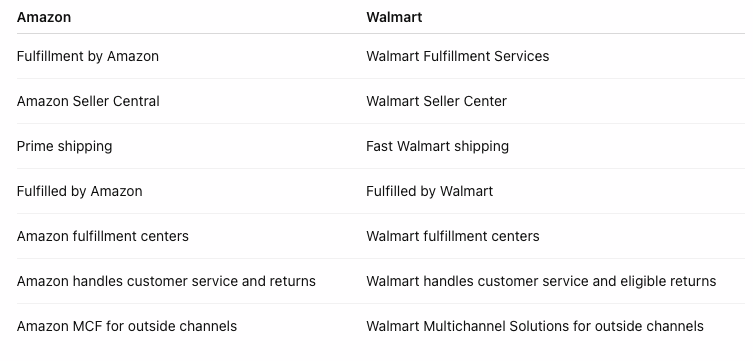
Amazon describes FBA as a service where sellers send inventory to Amazon and Amazon stores, picks, packs, ships and handles customer service and returns. WFS operates on essentially the same core model for Walmart Marketplace.
The important point is that you are not creating a second fulfillment strategy from scratch.
You are adding another marketplace to a strategy you already know.
Step 1: Open a Walmart Marketplace Account
Before you can use WFS, you need to sell on Walmart Marketplace.
Walmart currently asks prospective Marketplace sellers for information including:
- Business Tax ID or business license information
- Documents verifying the company's name and address
- A history of ecommerce or marketplace sales
- GTIN/UPC information using GS1 identifiers
- A catalog compliant with Walmart's prohibited-product rules
- A compatible payment setup
- U.S. fulfillment and returns capabilities, either through WFS or another qualifying operation
There are currently no setup or monthly subscription fees for Walmart Marketplace. Instead, Walmart charges referral fees when products sell. Most categories fall somewhere between 6% and 15%, although the exact rate depends on the category and sometimes the product's selling price.
For an FBA seller, the application should feel fairly familiar. You already have most of the underlying business information Walmart wants to see.
Step 2: Do Not Rebuild Your Entire Catalog by Hand
This is one of the first places existing marketplace sellers can save time.
Walmart provides a Catalog Import tool that can import listings from other marketplaces. You connect the alternative marketplace account, import the catalog and then review the listings inside Walmart.
That does not mean you should blindly copy everything.
Amazon and Walmart are different marketplaces, and product content that performs well on one may not be optimized for the other.
Use the import as a starting point.
Then review:
- Product titles
- Images
- Product attributes
- Variations
- Descriptions
- Category placement
- UPC/GTIN matching
- Price
- Search terms and Walmart listing quality recommendations
Think of it as migrating the infrastructure, not copying and pasting your entire Amazon strategy.
Step 3: Activate WFS
Once your Walmart Marketplace account is active and you have products set up, you can enroll in Walmart Fulfillment Services through Seller Center.
You do not have to convert your entire catalog.
Walmart allows sellers to select individual products for WFS, and there are currently no inventory minimums or maximums required by the program. Walmart says sellers can use a combination of WFS and seller-fulfilled shipping if that makes more sense for their assortment.
This is where I would strongly recommend that FBA sellers resist the urge to send everything.
Start with the products you already know work.
Which Products Should You Send to WFS First?
Your Amazon account has already given you something extremely valuable: demand data.
Use it.
Your first WFS shipment should probably be built around products that already have:
- Consistent FBA sales
- Healthy gross margin
- Predictable replenishment
- Low return rates
- Manageable dimensions
- Strong reviews or brand recognition
- Enough inventory to split between Amazon and Walmart
Do not treat Walmart like a liquidation channel for products that did not work on Amazon.
Start with winners.
If a SKU already has proven demand, good margins and a manageable fulfillment profile, it gives you a much cleaner test of Walmart demand.
A good first experiment might be 10 or 20 of your strongest products rather than 500 slow-moving SKUs.
Walmart itself recommends focusing WFS conversion on high-volume products, best sellers and promotional items.
Step 4: Make Sure Your Products Are Eligible
WFS has expanded significantly and can now handle much larger products than many sellers may remember.
Walmart currently identifies products as good candidates for WFS when they are:
- Up to 500 pounds
- No larger than 120 x 105 x 93 inches including packaging
- Non-perishable
- Not temperature controlled
- Shipped domestically or already cleared through U.S. customs
There are additional restrictions and fees for certain regulated or hazardous products, so always check the current eligibility rules inside Seller Center before sending inventory.
This is another reason not to assume your entire FBA catalog should automatically become a WFS catalog.
Step 5: Understand WFS Pricing Before You Send Inventory
WFS pricing is fairly straightforward, but you still need to model it SKU by SKU.
Use Walmart's WFS pricing and cost estimator before making the inventory decision.
Current standard fulfillment fees start at:
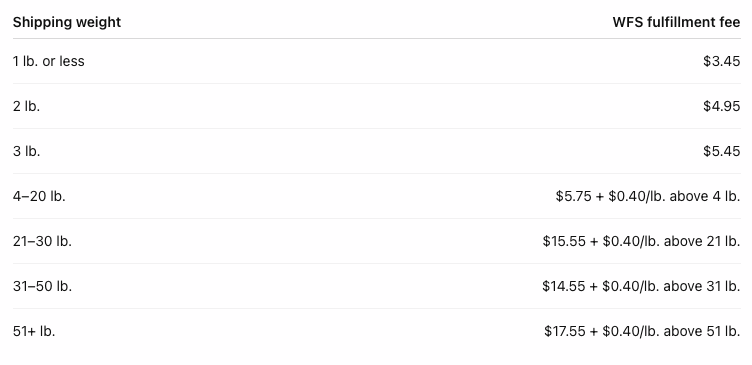
Walmart uses dimensional weight for many items above one pound, so an item that is lightweight but takes up a huge box can become much more expensive than you expect.
That should sound familiar to every experienced FBA seller.
The product's dimensions matter almost as much as the product.
Watch the Extra Fees
A few WFS charges deserve special attention.
For standard items, Walmart currently adds:
- $0.50 for apparel
- $0.50 for hazardous materials
- $1 for items priced below $10
- Additional charges for oversized products
That $1 low-price surcharge is especially important.
A $1 additional fee on a $7.99 product looks very different from the same fee structure on a $29.99 product.
Low-priced products with thin margins are exactly where you should run the numbers before shipping inventory.
Do Not Ignore Storage Costs
Storage is another area where experienced FBA sellers should feel at home.
WFS currently charges $0.75 per cubic foot per month from January through September.
During October through December, the base rate remains $0.75 per cubic foot for inventory stored 30 days or less, but another $1.50 per cubic foot is added once inventory has been sitting more than 30 days.
Long-term inventory gets more expensive:
- 366–450 days: $2.25 per cubic foot per month
- More than 450 days: $7.50 per cubic foot per month
The lesson is the same as FBA:
Fulfillment networks are not cheap long-term storage units.
Send inventory that you reasonably expect to sell.
Step 6: Create Your First Inbound Shipment
Once your products are configured for WFS, create an inbound order through Seller Center.
You will prepare the inventory according to Walmart's inbound requirements and send it to the assigned fulfillment location.
Walmart also offers its Preferred Carrier Program for sellers sending small parcel, less-than-truckload and certain full-truckload shipments into WFS.
The program provides Walmart-negotiated transportation rates and lets sellers manage inbound shipments through Seller Center. Walmart says some sellers using the program have also experienced faster appointment scheduling and receiving.
If you are currently shipping pallets or cartons into Amazon, this part of the process will feel very familiar.
Step 7: Let Walmart Handle Prep If It Makes Sense
You do not necessarily need your warehouse or manufacturer to perform every prep task.
Walmart offers WFS Prep Services for jobs such as labeling and polybagging.
Walmart says planned prep through WFS can cost 25% to 30% less than unplanned prep required after inventory arrives incorrectly prepared.
That does not mean Walmart prep will always be the cheapest option.
If your factory or 3PL can prep units correctly at a lower cost, keep doing that.
But it gives sellers another option, particularly when adding Walmart would otherwise require a separate prep workflow.
Step 8: Get the Inventory Live and Let the Badge Do Some Work
Once Walmart receives your inventory, WFS products become available for Walmart fulfillment.
Eligible listings receive the “Fulfilled by Walmart” experience and fast-delivery promises.
That matters.
On a marketplace, consumers do not care that you have a sophisticated warehouse strategy.
They care about questions like:
- “Will it arrive quickly?”
- “Can I return it easily?”
- “Do I trust the company fulfilling it?”
WFS answers those questions using Walmart's own brand and supply chain.
Walmart says WFS items with its fulfillment designation and delivery promises of two days or less have generated 50% higher GMV on average. Again, that is Walmart's aggregate first-party data, not a guarantee for your product, but it illustrates why fulfillment method affects conversion.
Step 9: Do Not Let Your WFS Inventory Go Out of Stock
This sounds painfully obvious.
It is also one of the easiest ways to kill momentum.
Walmart provides inventory health and replenishment tools inside Seller Center that identify out-of-stock inventory, items at risk of stocking out and suggested replenishment quantities.
Your Amazon sales history can help establish the initial order quantity.
After that, stop using Amazon demand as your only forecast.
Walmart has its own shoppers, promotions, search behavior and seasonality.
Build a Walmart-specific demand curve as quickly as possible.
The Smart Inventory Strategy: Don't Copy FBA 1:1
If you have 10,000 units sitting in FBA, that does not mean you should immediately ship another 10,000 to Walmart.
Your first objective is learning.
Start with enough inventory to:
- Stay in stock through the test
- Measure real Walmart demand
- Understand your conversion
- Evaluate returns
- Validate fulfillment costs
- Learn replenishment lead times
Then scale.
The worst outcome is not selling too little during your first month.
The worst outcome is sending six months of inventory into a network before you know whether the product sells there.
Your Amazon Bestseller May Not Be Your Walmart Bestseller
This is where marketplace expansion gets interesting.
Consumers overlap, but merchandising and search behavior do not perfectly overlap.
A product ranking fifth in your Amazon catalog may become number one on Walmart.
Another product might do almost nothing.
Price points can behave differently.
Categories behave differently.
Competition behaves differently.
That is why I would treat WFS as a portfolio test rather than simply cloning FBA.
Use your Amazon performance to decide where to start.
Use Walmart performance to decide where to scale.
Walmart Returns May Actually Be One of WFS's Bigger Advantages
WFS handles order-related customer service and eligible returns.
Customers can return qualifying Walmart.com purchases through the mail or at Walmart stores. Walmart says more than 4,600 retail locations participate in the WFS return experience.
For an online seller, that is an unusual advantage.
You get ecommerce fulfillment backed by a massive physical retail footprint.
The customer does not necessarily have to print a label, find packaging and make a trip to UPS.
They may already be going to Walmart.
That can reduce friction in the buying decision, particularly for shoppers who are less comfortable purchasing from unfamiliar marketplace sellers.
Here Is Where It Gets Really Interesting: Walmart Can Fulfill More Than Walmart Orders
WFS is not limited to Walmart.com anymore.
Through Walmart Multichannel Solutions, sellers can use inventory stored inside the WFS network to fulfill orders from other channels.
Walmart currently lists:
- Amazon
- eBay
- Shopify
- TikTok Shop
- Temu
- Seller-owned ecommerce websites
- Other sales channels
Orders can ship in unbranded packaging, with expedited two-day or lower-cost three-to-five-day service available. Walmart says its Multichannel Solutions network had a 97% average on-time delivery rate during the measured August 2025 through January 2026 period.
That opens up a much bigger strategic question.
Instead of thinking:
“Amazon inventory goes to FBA and Walmart inventory goes to WFS.”
You can eventually start thinking:
“Where should my inventory live?”
Should You Use WFS to Fulfill Amazon Orders?
You can.
Walmart explicitly supports Amazon orders through Multichannel Solutions.
Would I immediately pull your entire FBA inventory and move it into WFS?
No.
FBA still provides the native Prime experience on Amazon, and if Amazon is already working well for you there is little reason to disrupt it just to prove a point.
A smarter progression would be:
- Keep FBA inventory supporting Amazon.
- Use WFS inventory to support Walmart.
- Then test Walmart Multichannel Solutions for your Shopify store, social commerce or secondary marketplaces.
Once you understand the economics and service levels, you can make a more sophisticated inventory-allocation decision.
The goal is optionality, not creating another dependency.
Importing From China? Walmart Can Handle More of That Too
Sellers importing directly from Asia should also look at Walmart Cross Border: Imports.
The service moves full-container and less-than-container shipments from selected origins in China, Cambodia, India and Vietnam directly into WFS facilities.
Walmart can manage the freight cycle, customs process, exceptions and inbound handling within the program. Walmart reports an average 23-day port-to-door timeline in its FY26 analysis for units moving from China to Los Angeles and says inventory can then be distributed across as many as 10 U.S. fulfillment centers.
For an FBA seller already importing from Asia, this starts turning WFS into more than a pick-and-pack solution.
It becomes part of the inbound supply chain.
The 2026 New-Seller Incentives Are Worth Checking
As of November 2026, Walmart is advertising substantial incentives for qualifying new Marketplace sellers.
The current program includes up to $75,000 in combined New-Seller Savings, including:
- Referral-fee discounts tied to GMV
- Up to $2,000 in WFS credits
- Walmart Connect advertising credits
- Search-engine marketing credits
The WFS portion currently offers 10% off eligible fulfillment fees until a seller reaches $2,000 in savings. Eligibility conditions apply, so check the current terms rather than building your entire business case around a temporary promotion.
But if you were planning to test Walmart anyway, incentives can make the test cheaper.
The FBA Seller's Biggest WFS Mistakes
If I were launching an established Amazon brand on WFS tomorrow, these are the mistakes I would avoid:
- Sending the entire Amazon catalog immediately.
- Sending too much inventory before establishing Walmart velocity.
- Assuming Amazon listing copy is automatically optimized for Walmart.
- Ignoring dimensional weight.
- Ignoring the $1 fee on items priced below $10.
- Letting inventory sit through peak season without watching storage age.
- Treating Walmart as a secondary channel and allowing products to constantly stock out.
- Assuming a bad seller-fulfilled Walmart test means the product will also perform badly with WFS.
- Ignoring Walmart-specific advertising and listing-quality tools.
- Evaluating Walmart after two weeks instead of giving the marketplace enough inventory and time to produce meaningful data.
A Simple 30-Day WFS Launch Plan
If you already operate a successful FBA business, I would keep the initial launch extremely simple.
Week 1: Build the account
Apply to Walmart Marketplace, connect your business information and import your initial catalog. Do not import everything just because you can. Start with proven products.
Week 2: Model the economics
Run your best 10–20 SKUs through the WFS cost estimator. Compare: Product price - referral fee - WFS fulfillment - storage - landed product cost - expected returns - advertising Do not use revenue as your success metric. Use contribution margin.
Week 3: Send inventory
Create your first WFS inbound shipment. Send enough inventory to get a meaningful test without treating Walmart as if it already has your Amazon velocity. Make sure units are labeled and prepped correctly.
Week 4: Launch and optimize
Once inventory is live:
- Monitor impressions.
- Monitor conversion.
- Monitor Buy Box performance.
- Monitor inventory.
- Watch which SKUs move.
- Improve weak listings.
- Test Walmart advertising where appropriate.
Then replenish the products that actually earn more inventory.
Should Every FBA Seller Use WFS?
No.
If your product is prohibited, requires temperature control, has terrible unit economics, turns extremely slowly or only works because of a uniquely Amazon-specific audience, WFS may not make sense.
But if you already have:
- Proven ecommerce products
- Reliable inventory
- Established FBA operations
- Healthy margins
- A U.S. customer base
- Products consumers can also reasonably buy at Walmart
then ignoring Walmart entirely deserves a second look.
Especially because WFS removes one of the biggest historical objections:
“I don't want another fulfillment operation.”
You don't need one.
You Already Built the Machine
That is really the point.
Getting good at FBA is hard.
You had to figure out manufacturing, freight, prep, inventory planning, marketplace listings, customer reviews, advertising, returns and cash flow.
You already built the machine.
WFS gives you another place to plug it in.
You do not have to leave Amazon.
You do not have to abandon FBA.
You do not have to send your whole catalog.
Take your best products, put real numbers behind the economics, send a controlled amount of inventory into WFS and see what Walmart customers do with them.
The downside is a test.
The upside is discovering that you spent years building products and supply-chain infrastructure for one marketplace when the same operation could have been selling through two.
For sellers already using Amazon FBA, Walmart Fulfillment Services may be less about learning a new fulfillment model and more about finally using the one you already understand somewhere else.
Subscribe to Racklify News for up-to-date Logistics News & Events
Comments
Share this on Social Media:

Processing Request